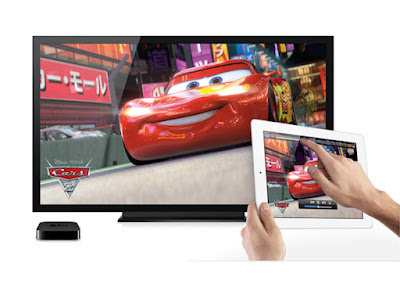
AirPlay is Apple's way of letting you play your music and videos on bigger and better speakers and screens around your house, without plugging anything in. It's basically a new and improved version of AirTunes, Apple's protocol for streaming music from iTunes to AirPort Express-connected speakers, but AirPlay expands things on several fronts: the type of media you can stream (videos and photos, in addition to music); the types of devices that can stream that media (iPads, iPhones, and iPod Touches) and the places to which that media can be streamed (Apple TVs and compatible third-party hardware, in addition to AirPort Expresseses)
AirPlay (previously called AirTunes when it was for audio only) is a proprietary protocol stack/suite developed by Apple Inc. that allows wireless streaming of audio, video, and photos, together with related metadata between devices. Originally only implemented in Apple's software and devices, Apple has licensed the audio-streaming portion of the AirPlay protocol stack as a third-party software component technology to manufacturer partners for them to use in their products in order to be compatible with Apple's iDevices.
There are two types of AirPlay devices: those that send audiovisual content, and those capable of receiving the content and rendering it on their display and/or speakers. AirPlay sender devices include computers running iTunes, and iOS devices such as iPhones, iPods, and iPads running iOS 4.2 or greater. Mac OS X Mountain Lion, scheduled for release in mid 2012, is slated to provide display mirroring via AirPlay. AirPlay receiver devices include AirPort Express (which includes an audio output connector), Apple TV, and third party speakers.
As of iOS 4.3, third-party apps may send compatible audio and video streams over AirPlay. The iTunes Remote app for iOS can be used to control media playback and select streaming devices.AirPlay wireless technology (receiver mode) is integrated into speaker docks, AV receivers, and stereo systems from companies such as Marantz, Bowers & Wilkins, Pioneer, and Denon. Song titles, artists, album names, elapsed and remaining time, and album artwork can appear on AirPlay-enabled speakers with graphical displays.
AirPlay allows an Apple TV or AirPort-enabled computer with the iTunes music player to send a stream of music to multiple (three to six, in typical conditions) stereos connected to an AirPort Express or Apple TV. Speakers attached to an AirPort Express or Apple TV can be selected from within the "Remote" iPhone/iPod Touch application, allowing full AirPlay compatibility. The AirTunes part of the AirPlay protocol stack uses UDP for streaming audio and is based on the RTSP network control protocol. The streams are transcoded using the Apple Lossless codec with 44100 Hz and 2 channels encrypted with AES, requiring the receiver to have access to the appropriate private key to decrypt the streams.AirPlay Mirroring is a slightly different technology that allows specific content to be broadcast from a variety of iOS devices and iTunes to a second generation Apple TV. The exact composition of the protocols that AirPlay Mirroring uses have not yet fully been discovered, nor reverse-engineered.
The AirPort Express' streaming media capabilities use Apple's Remote Audio Output Protocol (RAOP), a proprietary variant of RTSP/RTP. Using WDS-bridging, the AirPort Express can allow AirPlay functionality (as well as Internet access, file and print sharing, etc.) across a larger distance in a mixed environment of wired and up to 10 wireless clients
source :

(if attempting to AirPlay video content from Safari or Videos, begin playback first).

 or speaker
 next to each AirPlay device in the AirPlay menu indicate the type of media content you can stream to that device.
icon in the bottom-right corner of the iTunes application.